The UI Layer
The UI Layer
What is the UI Layer
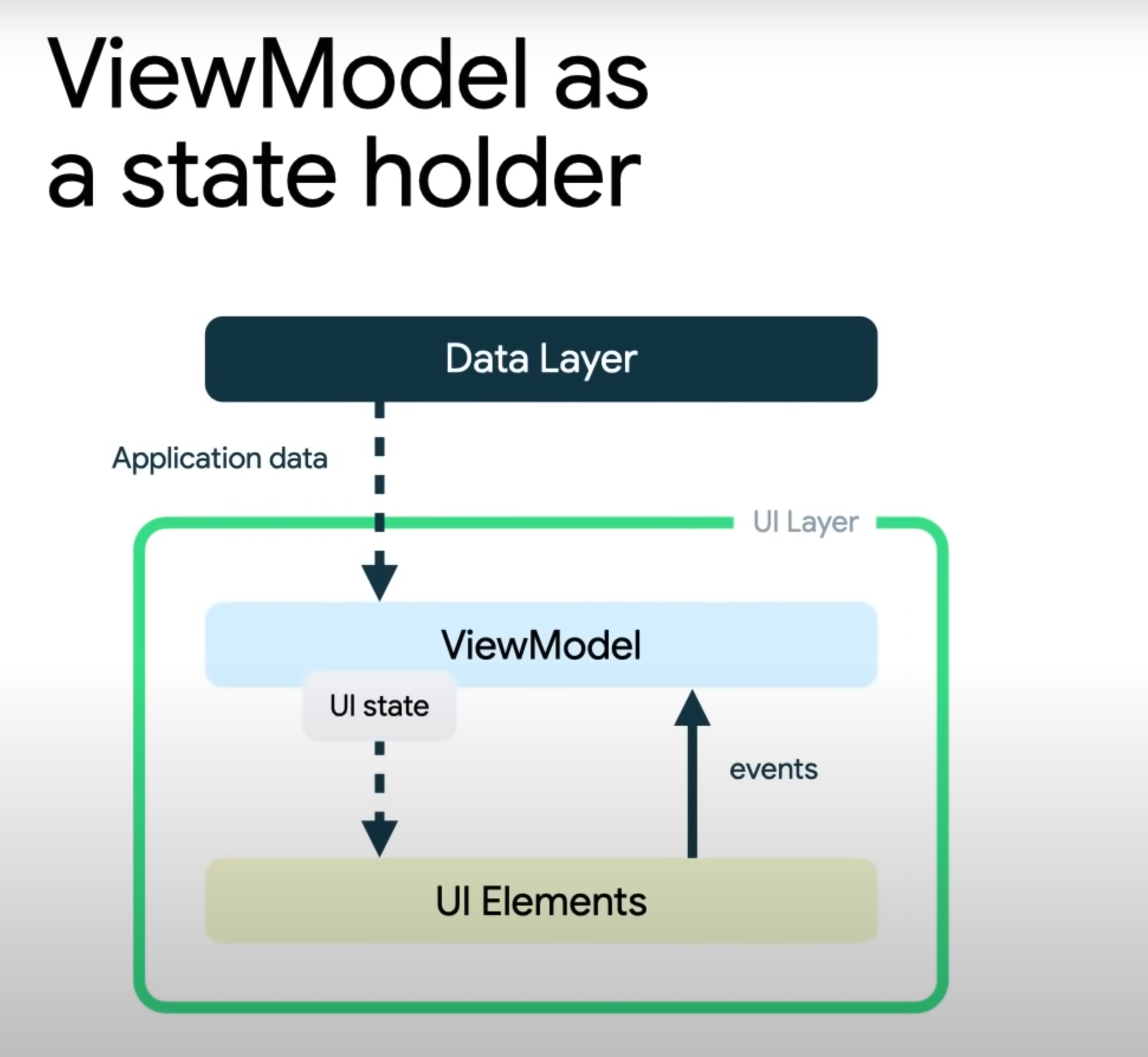
The presentation layer's job is to show data on the screen. Whenever the data changes, the UI should update to reflect these changes. It usually does the following tasks:
- Define the UI State
- Receiving data from The Data layer and turning it into UI State
- Expose that converted data to the UI
- Consume UI state and send it to the Data Layer
Main Components
The Presentation layer usually made of two things:
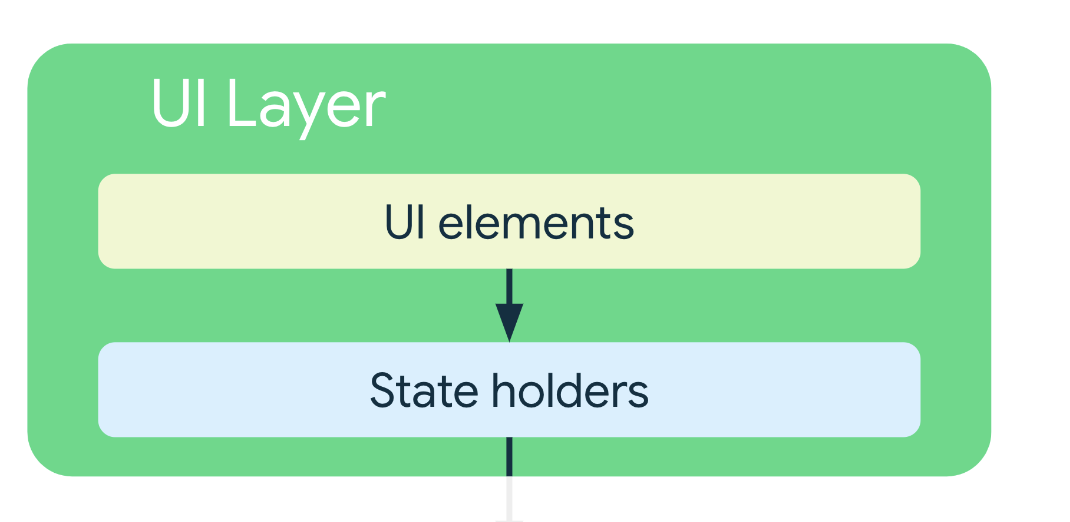
UI Elements
Elements that render the data on the screen and also react to user input, such as clicks, etc.
This UI elements can look like different in multiple platforms, like:
Composables/Activities/Fragmentson AndroidComponentsin ReactViewsin iOS
State Holders
As their name suggest state holders can hold data and expose UI immutable state, they also provide methods to update that UI State and communicate with the data/domain layers.
The state holders can come in a wide set of names, but he most common ones are:
ViewModels- Usually adopted in Mobile DevelopmentStores- Usually adopted in Web Development
Best practices
Architecture Patterns
There are multiple Design patterns that can help us avoid common mistakes on the UI layer.
MVVM
MVVM is the Go-To in Modern Mobile Development, and it works well by separating the UI data from the UI state, for Complex applications you can use MVI
MVC
Flux Architecture
While MVVM is the option for Mobile development (but not limited to it) Flux architecture is the most used architecture in the web. This mainly because of the complexity and amount of components that a website can have.
Immutability
The UI state should be immutable. The key benefit of this is that
You should never modify the UI stat in the UI directly. Unless the UI itself is the sole source of this data. i.e
If you have a toggable FAQ component that reacts to the user click, that's an example of state that can be saved on the UI.
Types of logic
There are two types of logic in an app:
-
Business logic: Business logic is the implementation of product requirements. Business logic is usually placed in the The Data layer or The Domain layer.
-
UI Logic: Is how to display changes on the screen. i.e Display a message, alert or navigate
The UI logic, particularly when it involves life-cycle linked classes, like Context should live in the UI, not in the ViewModel.
Expose UI State
The data exposed to the UI should be Immutable and the state holder should expose different methods to update it and handle cases where it fails so that the UI updates accordingly.
class NewsViewModel(
	private val repository: NewsRepository,
	...
): ViewModel() {
   var uiState by mutableStateOf(NewsUiState())
		private set
	private var fetchJob: Job? = null
	fun fetchArticles(category: String) {
		fetchJob?.cancel()
		fetchJob = viewModelScope.launch {
		try {
			val newsItems = repository.newsIFCategory(category)
			uiState = uiState.copy(newsItems = newsItems)
		}
		 catch (ioe: IOException) {
// Handle the error and notify the UI when appropriate.
		val messages = getMessagesFromThrowable(ioe)
		uiState = uiState.copy(userMessages = messages)
	  }
  }
}
}
Naming conventions
The recommended naming convention is combining the functionality of the screen or part of the screen they describe. Plus UIState
functionality + UIState
Unidirectional Data Flow
Unless the UI state is very simple, the UI's sole responsibility should be to consume and display UI state.
Define UI State
The UI is the visual representation of the UI state.
data class NewsUiState(
	val isSignedIn: Boolean = false,
	val isPremium: Boolean = false,
	val newsItems: List<NewsItemUiState> = listOf(),
	val userMessages: List<Message> = listOf()
)